Blog
Looking for structured courses? Check out Notes →
by Me · Aug 04, 2026
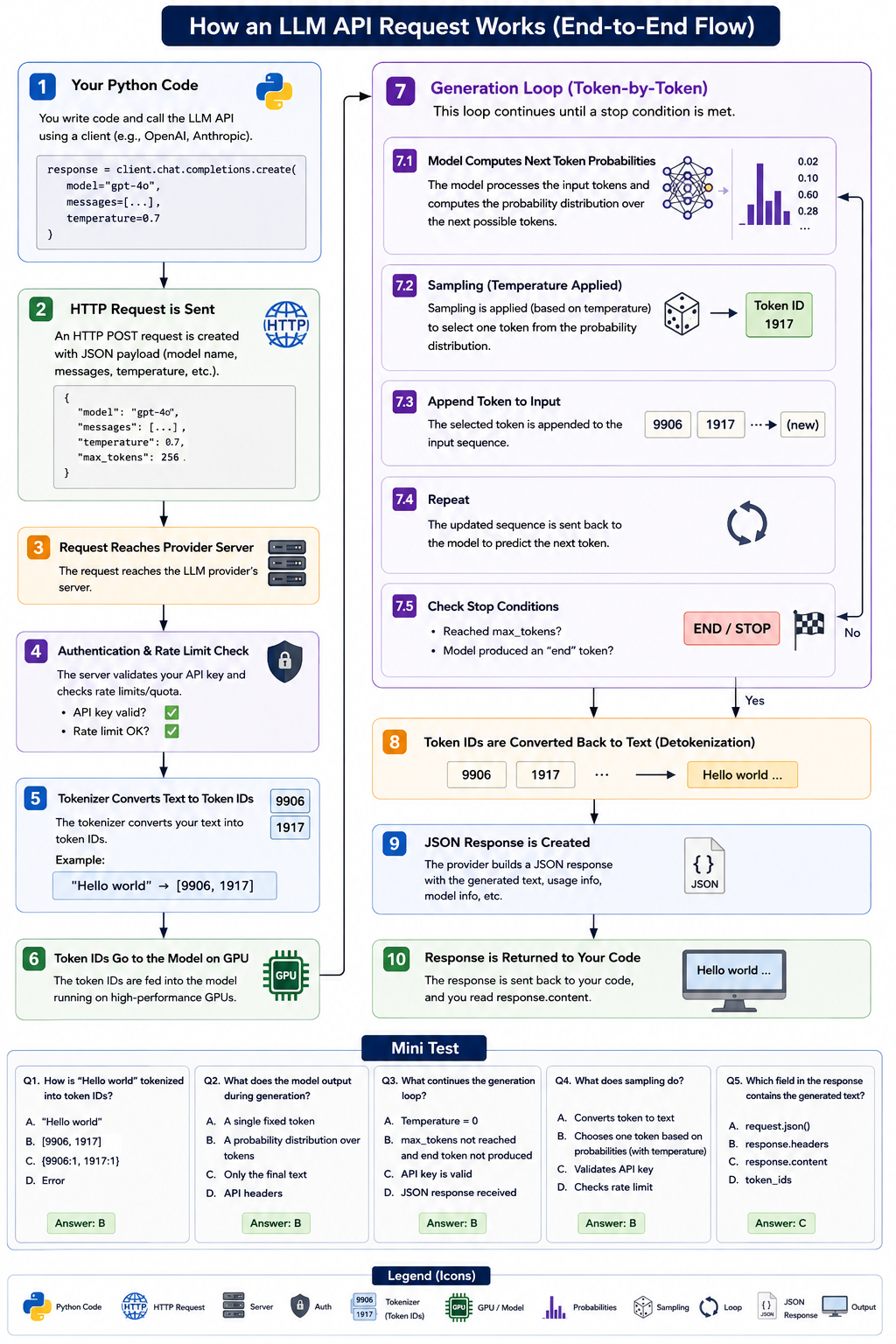
Learn how an LLM API request works internally. Understand HTTP requests, authentication, tokenization, GPU inference, token generation, sampling, detokenization, and JSON responses with clear diagrams and examples.
by prakas shrestha · Apr 27, 2026
How Does Document Chunking Work? How Does Search Happen When a Query Arrives?
Step-by-Step Explanation
Introduction — Why Should You Learn RAG?
Nowadays, many systems such as AI chatbots, document search systems, and company AI assistants are built using RAG (Retrieval-Augmented Generation).
If you are:
- Learning Data Science
- Interested in AI/LLM Engineering
- Planning to build chatbots or document search systems
then understanding RAG is an extremely important skill.
In this blog, we will explain RAG step by step in a way that even a complete beginner can understand.
What Is RAG? — Simple Definition
RAG = Retrieval + Generation
This means:
- Retrieval → Search for relevant information from documents
- Generation → Use an LLM to generate an answer
In simple words:
RAG is a system that searches for the correct information from documents before generating an answer.
Instead of allowing an AI model to simply guess an answer, RAG provides the model with relevant information from trusted documents.
Understanding RAG with a Real-Life Example
Imagine that a company has:
- 1,000 PDF files
- Company policies
- Research notes
- Internal documents
Now, a user asks:
"How many days of sick leave are allowed?"
Instead of allowing the AI to guess the answer, the system:
- Searches for documents related to sick leave
- Finds the relevant section
- Reads the relevant information
- Generates an answer based on that information
This entire process is called RAG.
Main Components of a RAG System
A typical RAG system contains these five main components:
- Documents
- Chunking
- Embeddings
- Vector Database
- LLM
Now, let's understand each step.
Step 1 — Document Loading
First, we need a document.
For example:
- Leave Policy
- Sick Leave Policy
- Work From Home Policy
A document can contain a large amount of text.
For example:
Leave Policy

Employees can take annual leave according to company policy.

Sick Leave

Employees can take sick leave when they are ill.

Work From Home

Employees can work from home after receiving approval.
The Problem
Searching through a very large document directly can be inefficient.
Therefore, we move to the next step:
Chunking
Step 2 — Chunking — One of the Most Important Concepts
Chunking means splitting a large document into smaller pieces called chunks.
Original Document
Section 1 → Leave Policy

Section 2 → Sick Leave

Section 3 → Work From Home
After chunking:
Chunk 1
Leave Policy

Employees can take 20 days of annual leave.
Chunk 2
Sick Leave

Employees can take sick leave when they are ill.
Chunk 3
Work From Home

Employees can work from home when approved.
Why Do We Create Chunks?
Chunking helps because:
- Search becomes more efficient
- The system can find only the relevant part
- Less unnecessary information is sent to the LLM
- Retrieval accuracy can improve
- Large documents become easier to process
What Is a Typical Chunk Size?
A common starting point is:
- 300–500 words per chunk
- 50–100 words of overlap
For example:
Chunk 1 → Words 1–500
Chunk 2 → Words 450–950
Chunk 3 → Words 900–1400
Why Is Overlap Used?
Suppose an important sentence starts at the end of one chunk and continues into the next chunk.
Without overlap, the meaning may be separated.
Overlap helps preserve context and reduces the chance of losing important information during chunking.
Step 3 — Embeddings — Converting Text into Numbers
Computers cannot directly understand the meaning of text in the same way humans do.
Therefore, text is converted into a numerical representation called a vector.
For example:
Text
Sick leave is allowed when an employee is ill.
Vector
[0.78, 0.22, 0.19, 0.55, ...]
This process is called Embedding.
The vector represents the semantic meaning of the text.
Texts with similar meanings tend to have similar vector representations.
For example:
"How many sick days are available?"
and
"What is the sick leave allowance?"
use different words, but their meanings are similar.
Their embeddings should therefore be close to each other in vector space.
Step 4 — Vector Database — Storing the Embeddings
After converting all document chunks into vectors, we store those vectors in a Vector Database.
Popular vector databases include:
- FAISS
- Pinecone
- Chroma
- Weaviate
The vector database allows the system to efficiently search for chunks that are semantically similar to a user's query.
Step 5 — What Happens When a Query Arrives?
Now, suppose the user asks:
"How many days of sick leave are allowed?"
The RAG system performs several steps.
Query Processing — Step by Step
Step 1 — Convert the Query into a Vector
The user's query:
How many days of sick leave are allowed?
is converted into a vector:
Query → Query Vector
The same embedding model is generally used to represent both the document chunks and the user query.
Step 2 — Perform Vector Search
The system compares the query vector with the vectors stored in the vector database.
For example:
Chunk 1 → Annual Leave Policy
Chunk 2 → Sick Leave Policy        ← Relevant Match
Chunk 3 → Work From Home Policy
The system retrieves the most relevant chunks.
This process is called Retrieval.
Step 3 — Send the Relevant Chunks to the LLM
The system sends the user's question together with the relevant retrieved context.
Question
How many days of sick leave are allowed?
Retrieved Context
Employees are entitled to 10 days of sick leave per year.
The LLM now has the relevant information needed to answer the question.
Step 4 — Generate the Final Answer
The LLM generates an answer based on the retrieved context:
Employees are entitled to 10 days of sick leave per year.
This is the Generation part of RAG.
A Simple Real-Life Analogy
Imagine that you are inside a large library.
A user asks:
"Where can I find a Python book?"
You do not read every book in the entire library.
Instead, you:
- Search the library index
- Find the relevant section
- Locate the Python books
- Open the relevant book
- Provide the answer
The analogy is:
Library          = Vector Database
Search           = Retrieval
Relevant Book    = Retrieved Context
Answer Generation = LLM
That is the basic idea behind RAG.
Simple RAG Pipeline Summary
The complete RAG workflow looks like this:
1. Load documents
        ↓
2. Split documents into chunks
        ↓
3. Convert chunks into embeddings
        ↓
4. Store embeddings in a vector database
        ↓
5. Receive a user query
        ↓
6. Convert the query into an embedding
        ↓
7. Search for similar/relevant chunks
        ↓
8. Send the retrieved chunks to the LLM
        ↓
9. Generate the final answer